Paying for your web address doesn’t make it yours
A web address is leased, not bought, and the person who set it up may hold the lease. Here is how to check whose name is on yours.
If you pay for your shop’s web address, you probably think of it as yours. It is the name people type to reach your website, and the part after the @ in your business email. Paying for it does not make it yours. ICANN, which accredits the companies that register names ending in .com, .net and .org, says nobody owns one. The industry word is a domain. You do not “own” one, ICANN says; registering it is “more like leasing the domain name from the registry operator that the domain name is associated with.”
Registrar and registrant
Whose name is on the lease. Two words matter. The registrar is the company the name is registered through. The registrant is “the person or entity that holds the rights to a domain name.” If you hired a developer to help, ICANN says, they “may have registered the domain name using their own contact details (even if you have paid them to register and manage the domain name).” Then the developer may be listed as the registrant.
Checking and moving your domain
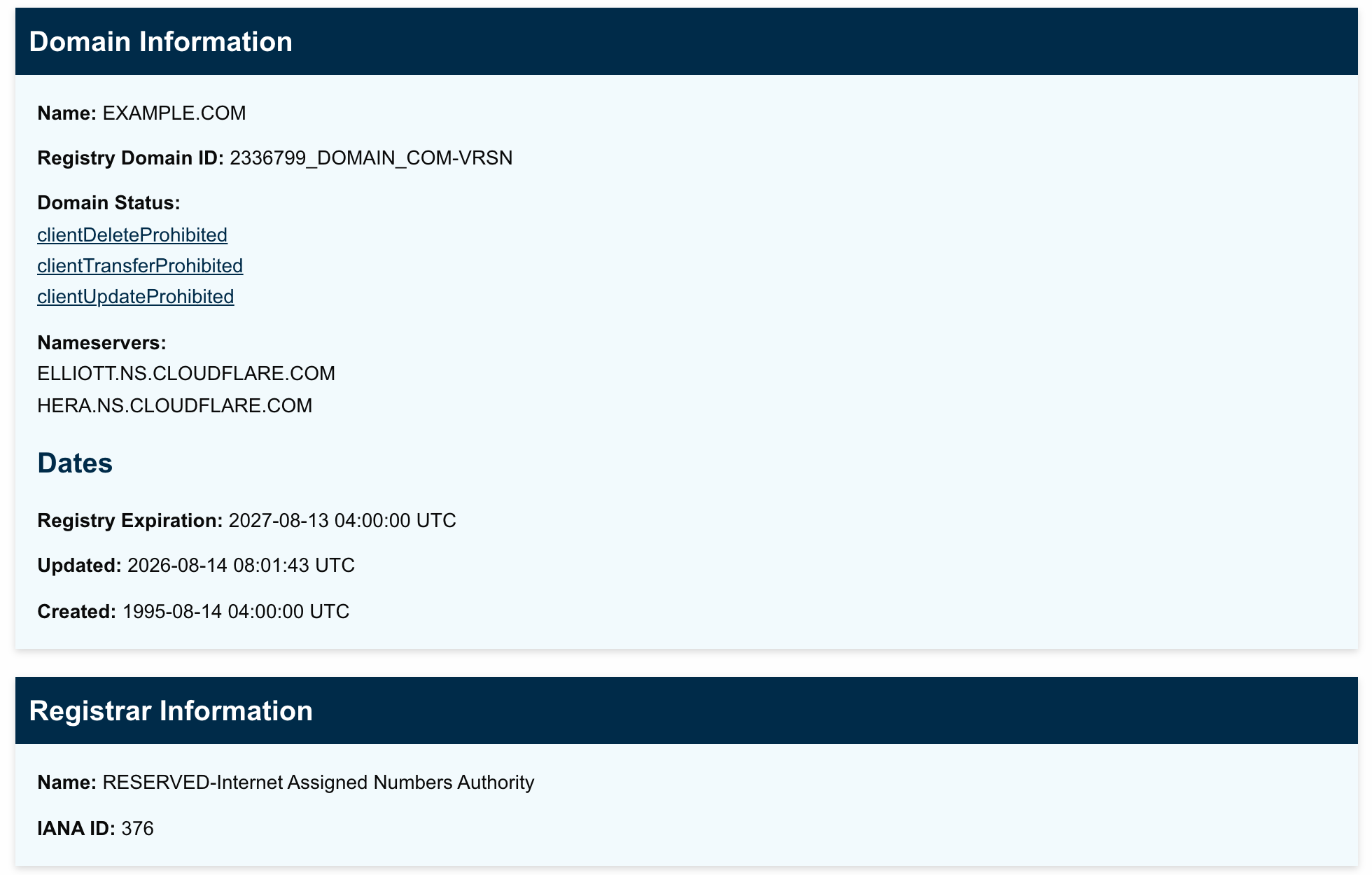
Look yours up. Go to lookup.icann.org, ICANN’s lookup tool. Type your web address in the box and click “Lookup.” Under Registrar Information, the Name line is your registrar. Under Dates, Registry Expiration is the day your current term ends. The screenshot shows ICANN’s result for example.com.
That page often won’t show whose name the domain is in. Where ICANN’s current rules apply, the holder’s name, street address and phone read “REDACTED.” To see the registrant, sign in to your registrar account or ask the registrar.
Check the email on the account. Renewal reminders go to the registrant’s email address on record. If that address ends in your own web address, the notice sent after the end date goes to an inbox that may already have stopped working. ICANN’s expiration policy suggests registrars ask holders for a second address “not associated with the domain name itself.” That is ICANN advising registrars. Our advice to owners goes further. Add an address from outside your domain to the account yourself. Keep your receipts too: ICANN says you may need proof of payment to show a registrar the name should be yours.
Moving it into the business’s name. You decide the business should hold the name; whoever has the registrar login does the paperwork. The step is called a change of registrant. It starts with the current registrar, which confirms it through a secure step, typically an email to the current holder.
When a domain expires
If the term runs out. For a .com, .net or .org, the registrar must send reminders about a month and about a week before the end date, and one more within five days after. Past the end date, ICANN says, the website and email on that name stop working. That is on purpose, as a last warning.
Then the registrar may delete the name right away. If it doesn’t, it may give you 1 to 45 days to renew, and ICANN warns the name could be auctioned to someone else in that time, depending on your terms. Once the name is deleted, the registrar must let you restore it for 30 days, possibly for a fee. Five days after that, it goes to whoever registers it first, and ICANN “does not have the authority to transfer domain names, including expired ones, back to you.”
ICANN’s own tips are simpler: mark the date on your calendar, and if you use auto-renew, keep the payment details up to date.
Ask your web person: Which registrar is our domain with, whose name is it registered in, and when does it expire? If it isn’t in the business’s name, please change it.
The Standard: Look up when your web address expires and who your registrar is, and make sure the business is the registrant.
Source: ICANN, “General Questions,” its renewal and transfer FAQs, the Expired Registration Recovery Policy, and an ICANN blog post on expired names; ICANN Lookup. Read Sept. 25, 2026.