Put holidays in special hours, not your weekly schedule
Google keeps separate settings for a normal week, a short break and a longer closure. The wrong one changes what customers see.
Before driving across East Hampton, a customer checks Google for one thing: are you open? The answer comes from whichever hours setting you used, and Google’s help pages give each setting its own job.
Regular hours are the times customers can come to you in a normal week. A seasonal business may enter its current season’s hours. If you close in the middle of the day, enter two sets of hours for that day; Google’s example is a Saturday open 9 AM to 2 PM and again from 5 PM to 10 PM.
Holidays and one-off changes go in special hours, which leave the regular week untouched. Google allows them for changed hours, or for a closure of six days in a row or fewer.
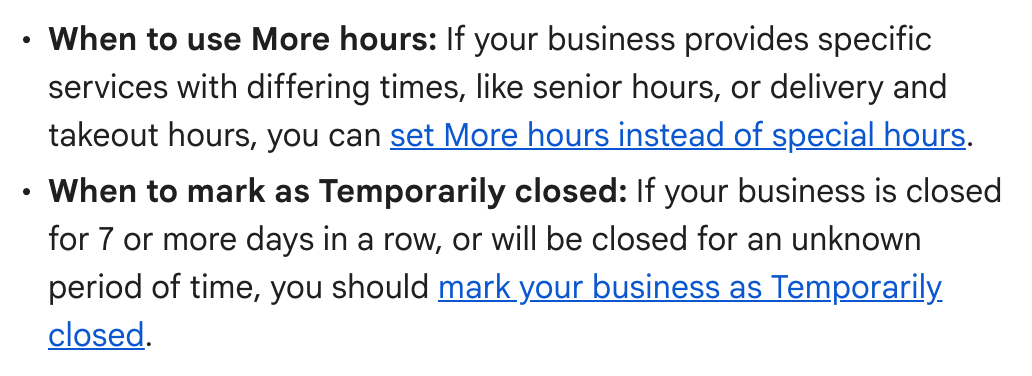
Which setting does which job, as Google lays it out:
- Regular hours: a normal week.
- Special hours: holidays, special events, and closures of six days or fewer.
- Temporarily closed: longer closures, the off-season, or no known reopening date.
- More hours: services on their own times, such as delivery, takeout or drive-through. Google says these should generally fall within your regular hours, and they show only once regular hours are set.
Why it matters. Temporarily closed is not a free choice for a short break. Google’s closing page says “For broad queries, temporarily-closed businesses can rank after open businesses,” so a listing marked closed can sit below open ones when someone searches for a kind of business rather than a name. Used for a real closure, the status does its job, which Google describes as sparing customers the disappointment of finding the door shut in person.
The seven-day gap. Google’s pages agree that six days or fewer is special hours and eight or more is Temporarily closed. At exactly seven they split: the special hours page sends a closure of “7 or more days in a row” to Temporarily closed, while the page on closing a business sends “7 days or less” to special hours.
Our advice: for a closure of exactly seven days, use special hours. Google’s closing page allows it, and it avoids the risk that same page flags for Temporarily closed: ranking after open businesses on broad searches.
Where to change it. Sign in to the Google account linked to your profile, then search Google for your business name and city or “my business” (in the Google Maps app, tap Business). (Not an owner or manager? Start with No. 1.) Select Edit profile, then Hours. The weekly schedule is under Hours, where Temporarily closed also lives. Holidays go next to Special hours, and service times under Add more hours. Special hours show only when your hours are set to Open with main hours, the choice that displays a weekly schedule; the other choice, Open with no main hours, keeps your hours off the profile.
Check yours today. Google says edits can take up to three days to appear, so look for the next holiday in your special hours now. If it is missing, add it even if you will keep your usual hours; Google suggests confirming holiday hours either way.
The Standard: Regular hours for a normal week, special hours for a holiday or up to six days closed, and Temporarily closed for eight days or more or no end date. At exactly seven days, where Google’s pages disagree, we would use special hours.
Source: Google Business Profile Help, “Edit your business hours,” “How to set Special hours,” “How to set More hours,” “Mark your business as closed,” “Guidelines for representing your business on Google” and “Find your business on Google,” read Sept. 24, 2026.