Your Google business name: the real one, with nothing added
Google wants the name your business actually goes by in that field. Extras could get a listing suspended.
When someone looks for a plumber or a pizza place on Google or Google Maps, the name on your listing is part of what they see. Google’s guidelines tie that field to helping customers find you, and they limit what can go in it.
The rule: “Your name should reflect your business’s real-world name, as used consistently on your storefront, website, stationery, and as known to customers.” Your address, service area, hours and category each have their own place on the profile. (The category is where you pick, from Google’s list, what kind of business you are.)
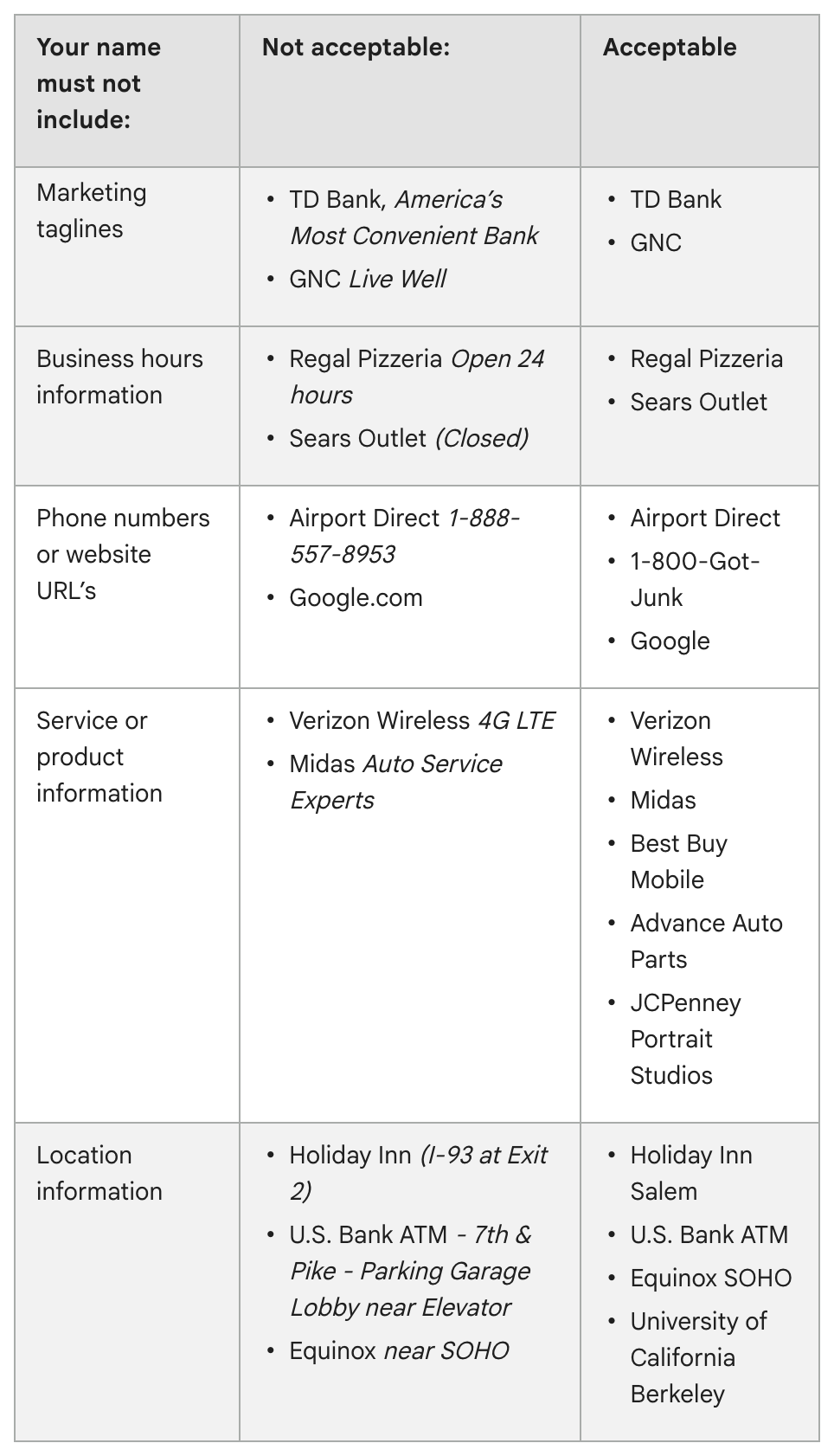
Google’s examples of what does not belong in a name:
- Marketing taglines
- Store codes
- Hours, or a note such as “Closed”
- Phone numbers or web addresses
- Words about your services or products, unless they are part of your real name
- Location details beyond the name you really use
- Trademark or registered signs, and words in all capitals
- Special characters such as %$@/ or irrelevant legal terms such as LLC, LTD or INC, unless you can show real-world proof, such as signage, business cards or invoices, that you use them consistently
Google’s example is a 24-hour coffee shop called Shelly’s Coffee. Its name field says Shelly’s Coffee and nothing else. “Open 24 hours” goes in the hours, and “Coffee shop” goes in the category.
Why it matters. Google says unnecessary information in a business name “isn’t permitted, and could result in the suspension of your Business Profile.” Its page on finding your business spells out what that means: a profile that violates the guidelines “becomes disabled or suspended and won’t show to other users on Google until you resolve the issue.”
The trap. Adding “East Hampton” or a word like “Plumbing” to the name in hopes of turning up in more searches. Unless those words are part of the name you actually use, Google’s examples rule them out. The town belongs in the address, the trade in the category.
Where to change it. Sign in to the Google account linked to your profile, then search Google for your business name and city or “my business” (in the Google Maps app, tap Business). Select Edit profile and correct the name. Google reviews a change before it goes live, and renaming a verified profile might mean verifying it again. If you aren’t yet an owner or manager, start with No. 1 in this series.
Check yours today. Put the name on your Google listing next to the one on your storefront, website and stationery. If Google’s version carries anything extra, take it out.
The Standard: Your Google name is the one on your storefront, website and stationery, the one customers know. Everything else goes in its own field.
Source: Google Business Profile Help, “Guidelines for representing your business on Google,” “Find your business on Google” and “Edit your Business Profile,” read Sept. 24, 2026.