Make your primary Google category exact; add others only for departments
Google says categories affect where you appear in local search. It asks for few of them, with the most specific one first.
A person who types nail salon into Google Maps is looking for a kind of business, not a name. Your primary category is the field that tells Google which kind you are. Google’s help page is direct about its weight: “The categories you select affect your local ranking on Google,” which is to say where you turn up in its local search results.
Google asks for the one category on its list that best describes the business, and the most specific one that fits. Its example: a nail salon should choose Nail salon, not Salon. The list is fixed. You cannot write in a category of your own, and if nothing specific fits, a more general one is the right choice.
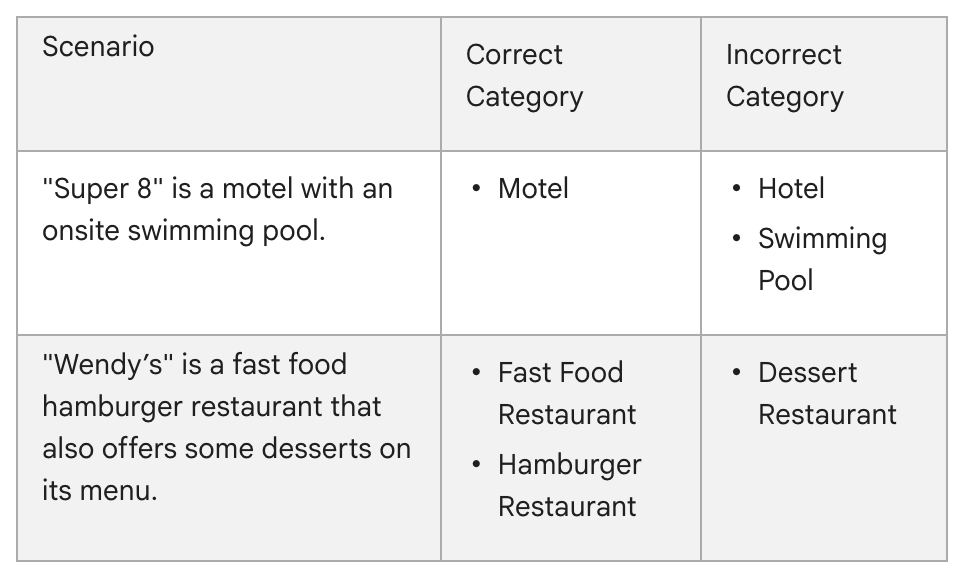
For a close call, Google offers a test. The category should complete the statement “This business IS a” rather than “this business HAS a.” In Google’s table, a motel with a pool on the property is a Motel, not a Swimming Pool, and a fast food hamburger restaurant that also sells some desserts is not a Dessert Restaurant.
Why it matters. A category picked to catch searches rather than to describe the business breaks Google’s rules. Its guidelines say not to use categories “solely as keywords,” and a profile that breaks the guidelines “becomes disabled or suspended.”
Before you add more. After the primary category, a profile can hold up to nine others. Google’s guidance is to use as few as possible, to skip a category for each product or service, and to save extras for real departments. Its example is a grocery store that adds Bakery and Deli. A narrow choice need not cost you broad searches: Google says a pizza restaurant “might” be shown to people searching for Restaurants, Italian Restaurants or Pizza.
If a separately run business operates inside yours, Google says it should have its own profile rather than a category on yours. Its example is a health club with an independently operated cafe: the club does not add Cafe.
Where to change it. Sign in to the Google account linked to your profile, then search Google for your business name and city or “my business” (in the Google Maps app, tap Business). (If you are not an owner or manager, start with No. 1.) Select Edit profile, then Edit next to Business category. Type in the Primary category box, choose from the list that appears and select Save. Google warns that editing a category might mean verifying the business again.
Check yours today. Finish the sentence “This business IS a” with your primary category. If the answer names something you have rather than something you are, change it.
The Standard: One primary category: the most specific one on Google’s list that says what the business is. Extra categories are for real departments, and as few as possible.
Source: Google Business Profile Help, “Manage your business category,” “Guidelines for representing your business on Google,” “Edit your Business Profile” and “Find your business on Google,” read Sept. 24, 2026.