Own your Google listing yourself, and let helpers manage it
Owners decide who else can work on a Business Profile, and only the primary owner can hand that top seat to someone else.
Your listing on Google Search and Maps is a Business Profile. Several people can work on it, but only owners decide who else has access.
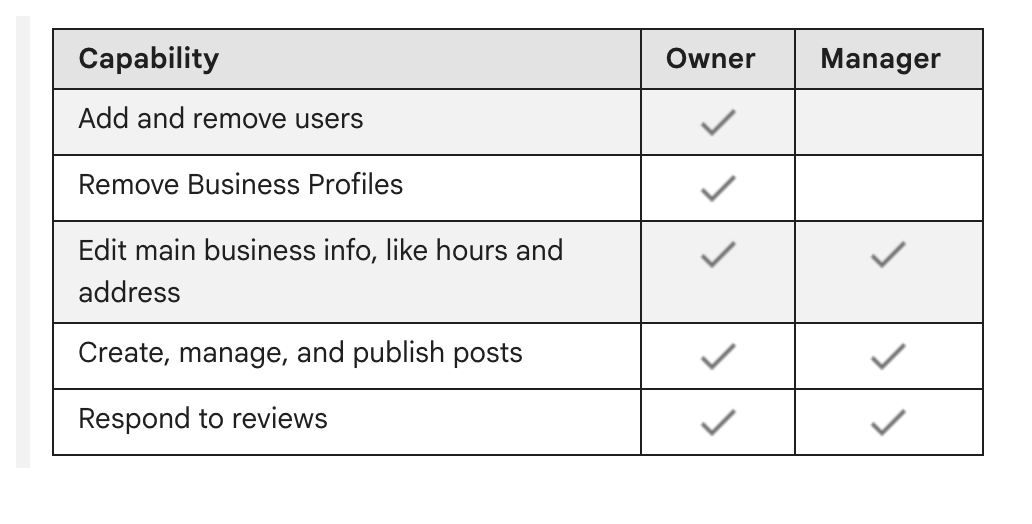
Owners have “full control over the profile. You can add or remove users, manage profile info, and even delete the profile.” Managers can edit the listing, answer reviews and post, but cannot add or remove users or remove the profile. A profile can have several owners but one primary owner, who alone can hand that title on and must do so before leaving.
Why it matters. Only owners can remove other owners and managers, and a removed user can no longer change business info or do admin tasks. If an owner is a former designer or employee, the business can be shut out.
The trap. A helper sets the profile up under their own Google account. Google says each user needs their own account, so no password has to be shared. Our advice: verify under an account the business controls, keep that account as primary owner, and add helpers as managers.
The methods Google may offer. Not every business gets every one:
- A code by phone call or text
- An email
- A live video call from the business, during business hours
- A code on a postcard, mailed to the business address. Most arrive within 14 days and expire after 30. Anyone who sees the mail can see the code, so keep it to yourself; Google says not to share it, even with managers. Until you enter it, leave your name, address and category alone.
Verifying is what makes you an owner, and it is free. With no profile at all, start at business.google.com/add. If an unverified profile for your business already exists, open it in Google Maps and select Claim this business, then Manage now. Once you finish the steps, it reviews the information you gave, which can take up to five business days and, rarely, longer.
If someone else already owns it. At business.google.com/add, find your business, select Request Access and fill out the form. The current owner is emailed and has 3 days to respond. If approved, Google says you “can now manage the Business Profile”; check People and access for your role. With no answer, you may be able to claim the profile by verifying, though that option isn’t always available. A service-area business with no shop or office must contact Google instead.
Where to change it. Sign in to the Google account linked to your profile, then search Google for your business name and city or “my business” (in the Google Maps app, tap Business). Then select More, Business Profile settings, People and access. To add a helper, select Add, enter their email, choose Manager under “Access” and select Invite. To move the primary owner seat, select someone already listed, then Edit next to “Access,” Primary owner and Save. Anyone newly added waits 7 days before they can delete or restore the profile, remove users or make anyone primary owner.
Check yours today. In People and access, see who is listed as primary owner. If it is not an account the business controls, change it. If the list won’t let you select anyone, Google says you may have only manager access.
The Standard: Verify under a Google Account the business controls, keep that account as primary owner, and add everyone else as a manager.
Source: Google Business Profile Help, “Find your business on Google,” “Add or claim your Business Profile,” “Verify your business on Google,” “Manage your Business Profile owners & managers,” “Request ownership of a Business Profile” and “Transfer primary ownership of a Business Profile,” read Sept. 24, 2026.