Using Google Search Console? Make the business the owner
Search Console is Google’s free tool for watching how your website turns up in its results. It’s optional, and if you use it, the account belongs in the business’s name.
When people search Google, your website can turn up in the results. Google offers a free tool, Search Console, for watching how it turns up there. Google says you don’t need it to be included, and tells a small business without much time for its website that it “might not need to use Search Console at all.” If you do use it, the account should be in the business’s name.
Who owns it matters most. In Search Console your website is called a property. Proving to Google that you control the site is called verifying, and a person who has done it is a verified owner. Owners can add and remove everyone else. Google’s rule is short: “A property must have at least one verified owner, or no users will have access to the property.” Our advice, not a Google rule: make the business a verified owner through a Google account the business controls, and give a designer or agency ordinary user access instead. Ask your web person whether the business is a verified owner, and whether someone else is the only one.
Setting up the property
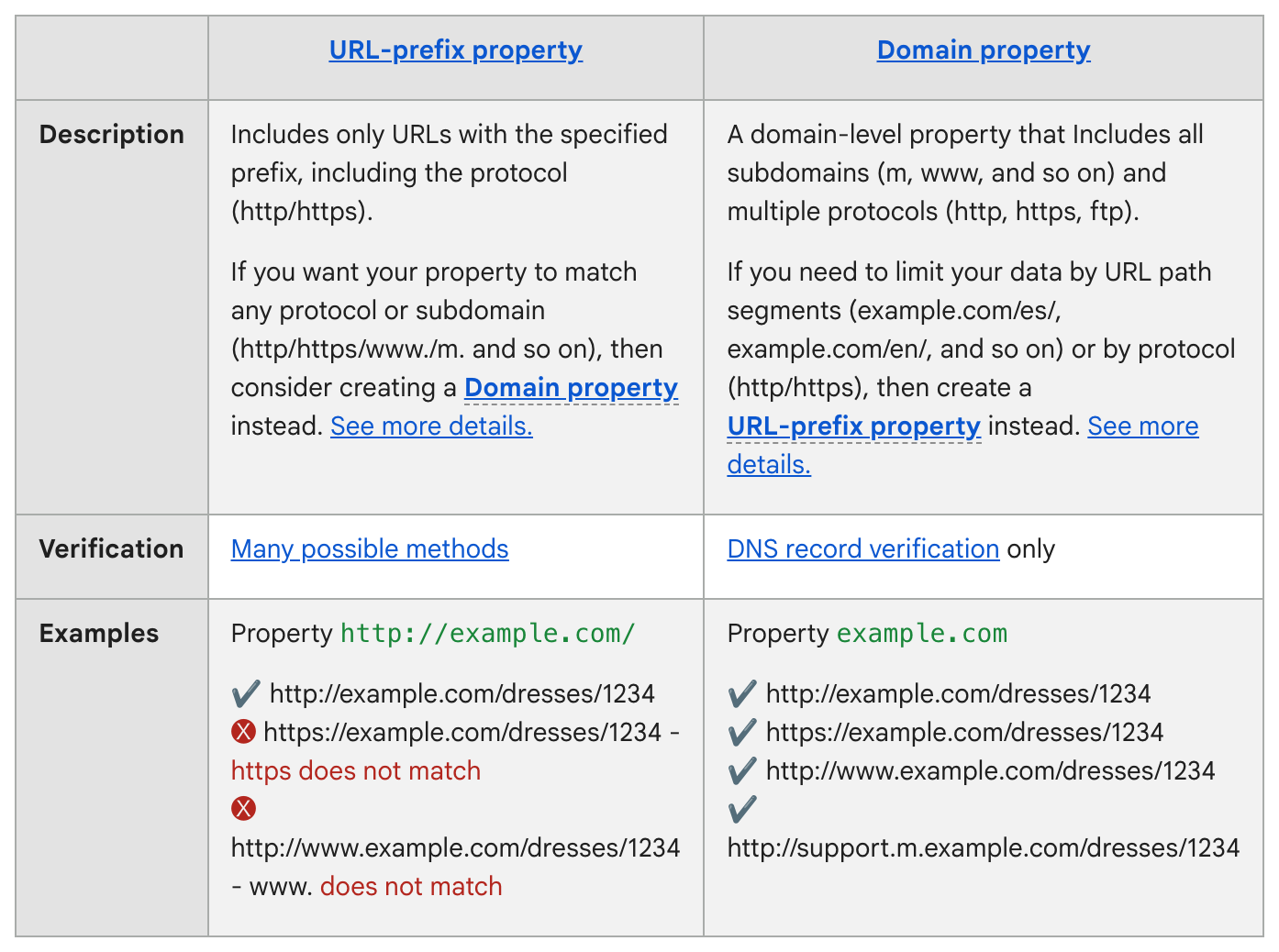
Setting it up. Sign in with the business’s Google account. Open the list of sites at the top of any Search Console page and choose + Add property. Google offers two kinds, compared in its table below. A Domain property covers every version of your address, with or without “www,” and can be verified only with a DNS record. That is a short line of settings kept at the company you bought your domain name, your web address, from. A URL-prefix property covers only addresses that begin exactly as you typed them, and can be verified several ways. So you start the verifying in the business’s account, and your web person adds the record Google gives you. On WordPress, Wix or Squarespace, check the platform’s help pages first; Google says some may verify you automatically. Data should arrive within a few days, Google says. Leave the record in place, because Google keeps checking for it.
Then look at two screens:
- Performance opens on three months of clicks (visits to your site from Google Search) and impressions (times your site appeared in the results), with the searches that brought them.
- URL Inspection shows the copy of a page Google last stored. Type your homepage’s full address into the bar at the top. For a new site, Google calls asking it to add the homepage to its records (the Request indexing button) the best first step, and adds: “Submitting a request does not guarantee that the page will appear in the Google Index.”
Removing a former owner
When someone leaves. Removing a person can take two steps. In Settings > Users and permissions, open the menu beside their name and choose Remove access. If they were a verified owner, Google then lists the proof of ownership they left behind. As long as it stays, they can verify themselves back in. Tell your web person: take that person’s verification record off our site.
The Standard: Search Console is free and optional, and it guarantees no place in Google. If you use it, the business itself should be a verified owner.
Source: Google Search Console Help: “About Search Console,” “Get started with Search Console,” “Add a website or platform property to Search Console,” “Verify your site ownership,” “Managing owners, users, and permissions,” the Performance report and Page indexing report pages, and “URL Inspection tool.” Read Sept. 25, 2026.