Your Google photos should show the place as it really is
Google sets the file rules, suggests the shots and may remove low-quality pictures. A removal for quality can’t be appealed.
Google’s case for a storefront picture is a practical one: an exterior photo helps a customer recognize the business on arrival. The inside, the products and the people each get their own suggestions.
The quality standard Google sets for every photo asks for pictures that are in focus and well lit, without significant alterations or heavy filters. It ends: “In other words, the image should represent reality.” Google’s photo tips page says the same and adds AI: a photo should have “no significant alterations or excessive use of filters or AI.”
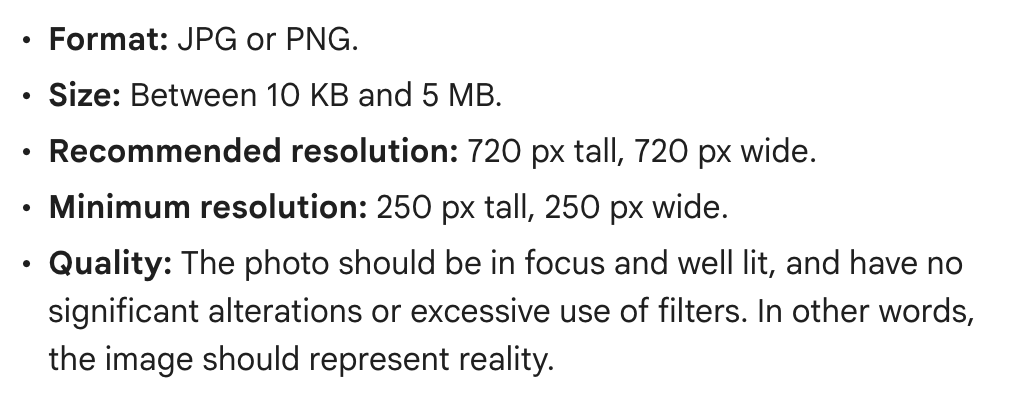
The file rules:
- JPG or PNG
- Between 10 KB and 5 MB
- 720 pixels tall and wide recommended; 250 by 250 at minimum
Google’s photo policy also sends owners to its criteria for pictures posted on Maps. Those say to use media you captured with a camera, and to avoid screenshots, stock photos, GIFs, collages, heavily edited pictures and “imagery created by other parties.”
Our advice: the criteria ask for media you captured and warn against imagery created by other parties, so the safest photos are ones you or your staff take at the business. If you do hire a photographer, hold the work to the same criteria: made at your location, with the location as the main subject.
Google suggests at least three exterior photos, taken from each direction a customer might approach, and at least three each of the interior, the products you sell and your team. Two slots are set apart: a cover photo at the top of the profile, and a logo to help customers recognize you.
Why it matters. Google says low-quality photos may be taken down, and “quality removals can’t be appealed.” A photo flagged for breaking policy is marked Not approved and doesn’t show up on Google Search or Maps. If your cover photo is low quality, Google may show a customer’s picture in its place.
The trap. Dressing up a photo with a border, words on top or a collage. Google’s Maps criteria say to avoid adding all three. Staff pictures carry one more rule: Google counts a person’s face posted without their consent as personal information, so ask first.
Photos that customers post are handled differently from yours. If one breaks Google’s policies, you can ask Google to remove it: open the photo, select Report a problem and choose a reason. The review can take several business days.
Where to change it. Sign in to the Google account linked to your profile, then search Google for your business name and city or “my business” (in the Google Maps app, tap Business). On a computer, click Photos, then Add photos; Add a cover photo and Add a logo are in the same place. In the Maps app, tap More, then Add photo. Uploads are reviewed and can take up to 24 to 48 hours to appear, and none show until the profile is verified. Not an owner or manager? No. 1 in this series covers that.
Check yours today. Look at your first exterior photo. Would a new customer know your door from it?
The Standard: Your photos, taken at your place, in focus and well lit, of what a customer will actually see.
Source: Google Business Profile Help, “Manage your Business Profile photos & videos,” “Tips for business-specific photos on your Business Profile,” “Business Profile photos, videos & posts content policy,” “Report inappropriate photos or videos on your Business Profile” and “Find your business on Google,” with Google Maps’ “Tips for posting media to Maps” and “Prohibited & restricted content,” read Sept. 24, 2026.